













WS-X45-SUP7L-E
‘
| Model: | WS-X45-SUP7L-E Catalyst 4500 E-Series Supervisor Engine |
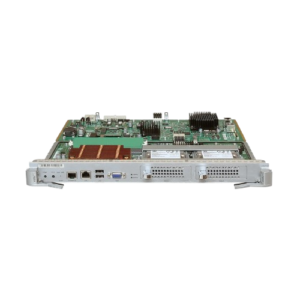
| Detail: | Catalyst 4500 E-Series Supervisor Engine 7L-E – 520Gbps – VSS |

WS-X45-SUP7L-E is a Catalyst 4500 E-Series Supervisor Engine 7L-E – 520Gbps – VSS. Identify it by part number rather than appearance: parts in this class frequently look the same across generations that will not work in each other’s place.
Fit is three questions. Which chassis generation the card is built for, which slots in that chassis will take it, and whether the software running today recognises it. Getting two right and the third wrong is the usual way a card arrives and will not go into service. Give us the chassis model and the software version and we will check all three.
How we supply it. Supplied new where available, otherwise as tested stock with warranty, subject to availability. Send us the host model along with the part number and we will check compatibility before you commit. We reply by the next working day.
WS-X45-SUP7L-E Specification | |
Feature | |
| Chassis compatibility | The Supervisor Engine 7L-E is supported on the Catalyst 4503-E, Catalyst 4506-E, Catalyst 4507R-E, and the Catalyst 4507R+E switch chassis. The Supervisor Engine 7L-E is not supported on the Catalyst 4510R-E or the Catalyst 4510R+E switch chassis. |
| Software requirements (minimum) | Refer to your software release notes for the latest software release requirements. |
| Chassis slot restrictions | •Catalyst 4503-E: Slot 1 only •Catalyst 4506-E: Slot 1 only •Catalyst 4507R-E and Catalyst 4507R+E: Slot 3 and slot 4 |
| Bandwidth per slot | 48-Gbps |
| Supervisor Engine 7L-E Front Panel Features | |
| STATUS LED | The STATUS LED indicates the current health of the supervisor engine and the current software state. •Green—All diagnostic tests have passed. •Orange—System boot or a diagnostic test is in progress. •Red—A diagnostic test failed. •Off—The supervisor engine is disabled or is not powered up. |
| RESET switch | The RESET switch is used to reset and restart the switch. Note Use a paper clip or other small, pointed object to press the RESET switch. |
| ACTIVE SUP LED | The ACTIVE SUP LED indicates whether the supervisor engine is active or in standby mode in redundant supervisor engine configurations. •Green—Supervisor engine is active (in redundant supervisor engine configurations). •Off—Supervisor engine is in standby mode (in redundant supervisor engine configurations). |
| UTILIZATION LEDs | When the switch is operational, the eight UTILIZATION LEDs indicate the current traffic load over the backplane as an approximate percentage value. Each LED represents approximately 12.5 percent of load. |
| USB connectors | Two USB 2.0 ports are provided: •Port 1 is not supported at this time. •Port 2 operates in host mode (downstream). It has a USB type A connector and a standard USB 2.0 device such as a flash memory device, can plug into this connector. |
| SECURE DIGITAL slot | A standard Secure Data (SD) memory card interface is provided on the front panel. |
| CONSOLE port | A 10/100/1000 port that uses an RJ-45 connector. The console port allows you to access the switch either locally (with a console terminal) or through a modem (remote). The port has an RJ-45 connector. The console port allows you to perform the following functions: •Configure the switch from the CLI. •Monitor network statistics and errors. •Configure SNMP agent parameters. |
| 10/100/1000 MGT port | The Ethernet management port is a Layer 3 host port to which you can connect a PC. You can use the Ethernet management port instead of the switch console port for network management. When managing a switch, connect the PC to the Ethernet management port on a Catalyst 4500 E-series switch. •Green—The link is operational. •Orange—The link is disabled by user. •Flashing orange—The power-on self-test indicates a faulty port. •Off—No signal is detected or there is a link configuration failure. Note When connecting a PC to the Ethernet management port, you must assign an IP address. |
| LINK LED | The 10/100/1000 MGT port has a LINK LED associated with it. |
| UPLINK (SFP/SFP+) ports | The Supervisor Engine 7L-E has four uplink ports. Ports 1 and 2 support either 10GBASE SFP+ transceivers or 1000BASE SFP transceivers. Ports 3 and 4 support only 1000BASE SFP transceivers. There are restrictions on the use of the uplink ports in both single supervisor engine and redundant supervisor engine configurations and both 10-G and 1-G operation. |
| Uplink port LEDs | There are two types of LEDs associated with the supervisor engine uplink ports. |
| Uplink port ACTIVE LEDs | Uplink ports on the supervisor engine are active in pairs. Two LEDs on the front panel show this activity. One LED, labeled 1G/10G 1-2 ACTIVE, indicates ports 1 and 2 are active; the other is labeled 1G 3-4 ACTIVE and indicates ports 3 and 4 are active. In standalone supervisor engine configurations operating in 1-Gigabit mode, all four uplink ports are active; both the 1-2 ACTIVE LED and 3-4 ACTIVE LED are lit green. In redundant supervisor engine configurations, only the 1-2 ACTIVE LED is lit green. When one supervisor engine is removed, both the 1-2 ACTIVE LED and 3-4 ACTIVE LED are lit green on the remaining supervisor engine when it is in 1-Gigabit operation. In 10-Gigabit mode, only the 1-2 ACTIVE LED is lit. |
| Uplink port STATUS LEDs | Uplink ports 1 and 2 each have two uplink port STATUS LEDs. The 1G LED displays port status when a 1-GB SFP transceiver is installed in the port socket. The 10G LED displays port status when a 10-GB SFP+ transceiver is installed in the port socket. Port 3 and Port 4 support only 1-GB SFP transceivers and have only the 1G port status LED. •Green—The link is operational. •Orange—The link is disabled by user. •Flashing orange—The power-on self-test indicates a faulty port. •Off—No signal is detected or there is a link configuration failure. |
Q & A
Related Products




Trusted IT Hardware,
Delivered Right.
Green Code Technologies is a UK-based IT hardware supplier trusted by businesses across 50+ countries — for genuine equipment, fast delivery, and expert support.
Enterprise IT Solutions Partner
Genuine, warranty-backed hardware from leading brands including Cisco, Huawei, HPE, Dell, Fortinet and more — sourced through authorised channels.
Fast UK & Global Delivery
Next-day delivery across the UK and rapid worldwide shipping. Orders placed before 2 PM are dispatched the same working day.
100% Authentic Hardware
Every product is verified for authenticity with verifiable serial numbers. We supply only genuine and certified equipment — no grey-market risk.
Expert Technical Support
Our in-house engineers provide free pre-sales and post-sales support to help you choose the right product for your infrastructure.
Competitive Pricing
We source directly from authorised supply chains to bring you the best enterprise IT hardware value without compromising on quality or warranty.
Sustainable IT Solutions
Sustainability is at our core. We offer eco-friendly certified-refurbished options alongside new hardware to reduce your organisation's carbon footprint.




Reviews
There are no reviews yet